Choose the right work
Enter hours against an assigned client, project, and task instead of relying on a separate description to explain where the time belongs.
Record time against the clients, projects, and tasks already assigned to your team. Weekly totals, comments, status, and recent activity stay together so each timesheet is easier to review and ready to submit.
Start free without a credit card.
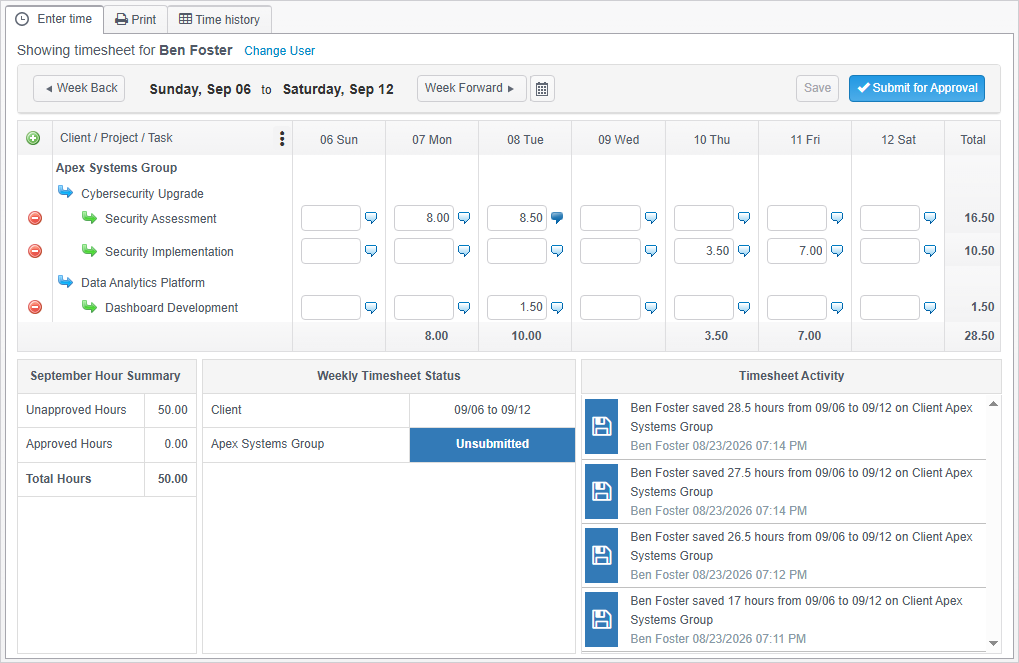
Each person works from the clients, projects, and tasks available to them. That structure keeps entry focused and gives the resulting hours useful context for review and reporting.
Enter hours against an assigned client, project, and task instead of relying on a separate description to explain where the time belongs.
Record daily hours and add comments when the entry needs more detail. Weekly totals update as the timesheet is saved.
Check the week, totals, and current status before sending completed time into the approval workflow.
Users can save work in progress, confirm the date range and total hours, and submit completed time for approval. The timesheet status shows whether work is unsubmitted, pending approval, or approved.
Approval responsibilities can be configured by user and client. Authorized approvers can review submitted time and approve, reject, or reopen it as the workflow requires.
Explore timesheet approvals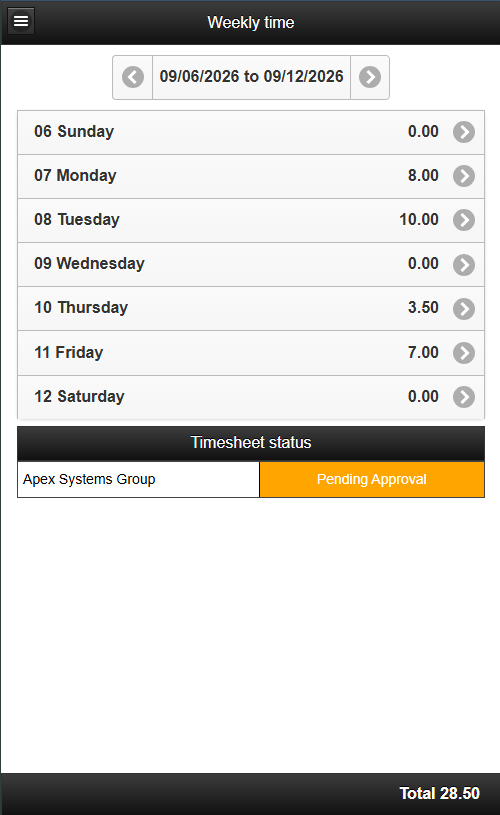
The mobile app gives users a focused way to review daily totals and enter time by client, project, and task. Hours and comments stay connected to the same weekly timesheet used on the desktop.
Organized time records support more than a weekly total. Timogix preserves the work dimensions and status needed for reporting and follow-up.
Classify tasks as billable or non-billable, then separate the resulting hours in reports.
Review recorded changes to understand who changed an entry, when it changed, and what was updated.
Use client, project, task, user, status, and billable details according to each person's permissions.
Create a free account without a credit card.